
Photo by Christopher Gower on Unsplash
Microsoft Features: Microsoft Purview Data Loss Prevention
Reading Time: 5 minutes
Microsoft Purview Data Loss Prevention (DLP) policy and rule names often come as an afterthought during a DLP program implementation. Unlike sensitivity labels, end users do not see the DLP policy and rule names, so many organizations underestimate their importance. In reality, the DLP naming convention that organizations follow will have long-lasting impacts on the successful management and operationalization of their DLP program.
Note: This post was created in collaboration with Antonio Maio, whose expertise and insights were instrumental in shaping the perspectives shared here.
The Importance of DLP Naming
Following a well-crafted DLP policy and rule naming convention results in a clear understanding of policy intent and function. This has many positive impacts, including:
- Facilitates a shared understanding of policy function across teams.
- Administrators can effectively uncover policy coverage gaps.
- Clear communication of policy coverage to both technical and business stakeholders is supported.
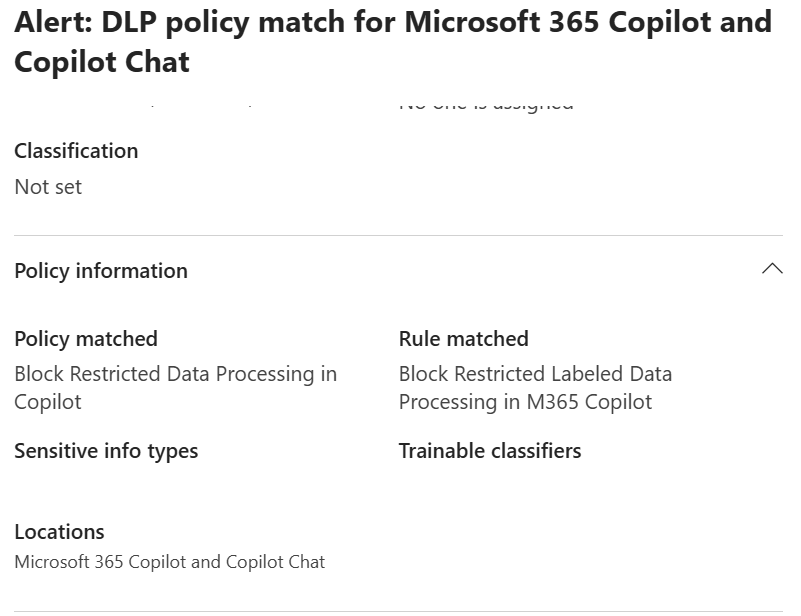
- Analysts benefit from the additional context provided by DLP policy and rule names in surfaced alerts (e.g., Purview Audit log, Purview Data Loss Prevention Alerts page, Defender incidents and alerts, etc.).
- Debugging DLP policies and rules that are not functioning as expected is made easier.
In summary, DLP naming significantly improves policy management, stakeholder communication, and alert review.
Technical Details on DLP Policy and Rule Names
There are a couple of technical details that organizations should be aware of regarding DLP policy and rule names:
- DLP policy names must be unique across all DLP policies.
- DLP rule names must be unique across all DLP rules (including those in different policies).
- Administrators can update DLP policy and rule names.
- Note: In the past, it was not possible to update DLP policy names after creation. This meant that including action words (e.g., audit, block, etc.) in the DLP policy name was not recommended. Nowadays, policy and rule names can be updated, meaning that action words can be included and changed throughout the policy’s lifecycle to accurately reflect its function.
- Note: Policy and rule name changes are only reflected in newly generated alerts.
- The limit for policy and rule name length is 64 characters
- Note: This means that policies must be concise yet descriptive. This is an important and challenging balance to strike.
- Names cannot contain any of the following characters: \ \\ < > , ; + = # “
A Recommended DLP Naming Convention
Now that we understand the importance of policy naming and several technical details, it’s time to discuss a recommended DLP naming convention. The main thing to keep in mind is that effective naming comes down to concisely and accurately describing the policy / rule while being as specific as possible. Consistency is also important; meaning, its important to use a consistent approach to how you name all your DLP policies and rules, and therefore to have a standard naming convention for them. Think of these names as very compressed policy / rule intent statements.
At its core, an effective DLP name should include 3 key pieces of information:
- The action taken (e.g., block, alert, audit)
- The condition queried (e.g., Restricted data)
- The location in which it applies (e.g., SharePoint), and if applicable, which group it applies to (e.g., all company, finance, etc.)
This leads to the following recommended naming convention:
“<Action (Block / Alert / Audit)> <Condition> in/on/to <Location>”
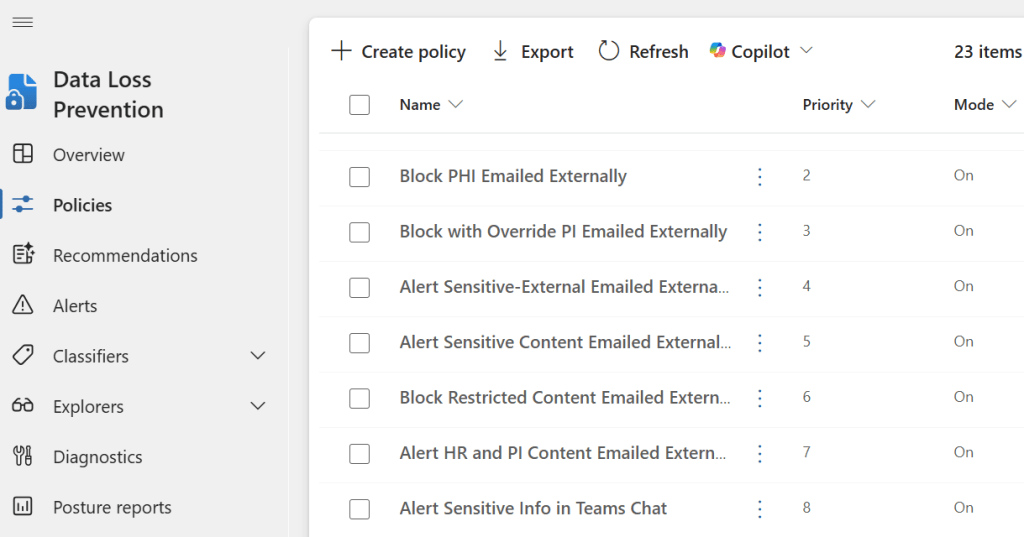
- E.g., “Block Restricted Data Processing in M365 Copilot”
- E.g., “Audit Exfiltration of Confidential data on Endpoints”
- E.g., “Alert External Sharing of Sensitive Data in M365”
Note: Naming conventions that include different permutations of <Action> <Condition> and <Location> components are also effective (e.g., Location – Action Condition).
Starting the policy or rule name with an action word, like Block, Audit, Alert, etc. immediately tells the reader what the policy will do. Following with the condition or type of data, immediately tells the reader the type of data or scenario in which the action will be performed. Ending the policy name with a location tells the reader where it will be enforced. This type of approach can enable administrators to quickly read or scan down their list of policies and rules and get a quick indication of the coverage their DLP policies and rules are providing.
Depending on the complexity of your DLP policies and rules, you may have to abstract or focus the action, condition, and location vocabulary to accurately reflect the policy intent. Although we aim to be as specific as we can be, we do not trade accuracy for specificity. For example, in a more complicated DLP policy with multiple rules that enforce different actions (e.g., those that leverage adaptive protection), a more generic “<Action>” word could be used (e.g., Control) to reflect the fact that there may be multiple rules in the policy with different actions (e.g., one rule blocks, another audits).
DLP Naming Do’s and Don’ts
When it comes to DLP policy and rule naming do:
- Be as specific as possible while comprehensively capturing the entire policy intent
- Start with an action verb
- Concisely summarize the condition
- Specify the location the DLP policy / rule applies to
- Be consistent with the action, condition, and location terminology, and the order in which they are used, across all DLP rules and policies
On the other hand, do not:
- Use name differentiators like “DLP policy 1” or “DLP policy 2.” Ensure each policy name is unique and descriptive so it’s clear what each policy covers and how it differs from others.
- Be generic with the policy / rule naming.
- Be overly specific with the policy / rule naming.
- Have many test policies in your production environment, that sit disabled or unused for long periods of time
- Hesitate to update DLP names as the policy and rules evolve.
Closing Thoughts
Clear and consistent DLP policy and rule naming is essential for effective DLP programs. Well-defined names help with policy management, stakeholder communication, and alert review. By following the recommended naming convention outlined in this blog, organizations can ensure their DLP implementation remain adaptable, transparent, and easy to maintain as needs evolve.

