
Microsoft Features: Microsoft Purview Data Loss Prevention
Estimated Reading Time: 5 minutes
What is Microsoft Purview Data Loss Prevention?
Microsoft Purview Data Loss Prevention (DLP) is a solution that helps organizations monitor and prevent accidental and malicious organizational data leakage. By deploying policies in DLP, organizations can govern data flows across locations such as Microsoft 365, user devices, third-party cloud applications, and on-premises repositories.
Organizations implement DLP for a variety of reasons such as:
- Preventing unauthorized access, sharing, and leakage of sensitive data (e.g., Personally Identifiable Information such as names, social insurance numbers, etc.).
- Ensuring compliance with data regulations applicable to the organization such as GDPR, HIPAA, PIPEDA, and PCI-DSS.
- Monitoring user actions relating to accessing and handling of sensitive data for the purpose of identifying data security risks and proactively protecting high-priority data.
Some of the key features supported by Microsoft Purview DLP include:
- Monitor user activities across Microsoft 365, endpoints, third-party cloud applications, and on-premises workloads.
- Educate users on unapproved information flows via Purview DLP policy tips.
- Automatically protect data by enforcing blocking actions when the conditions of DLP policies are met.
- Provide detailed insights for administrators to review for the purpose of improving DLP policies.
Below are some great Microsoft resources that you can refer to for more information:
- Learn about Cloud DLP: https://learn.microsoft.com/en-us/purview/dlp-learn-about-dlp
- Learn about Endpoint DLP: https://learn.microsoft.com/en-us/purview/endpoint-dlp-learn-about
- Learn about On-Premises DLP: https://learn.microsoft.com/en-us/purview/dlp-on-premises-scanner-learn
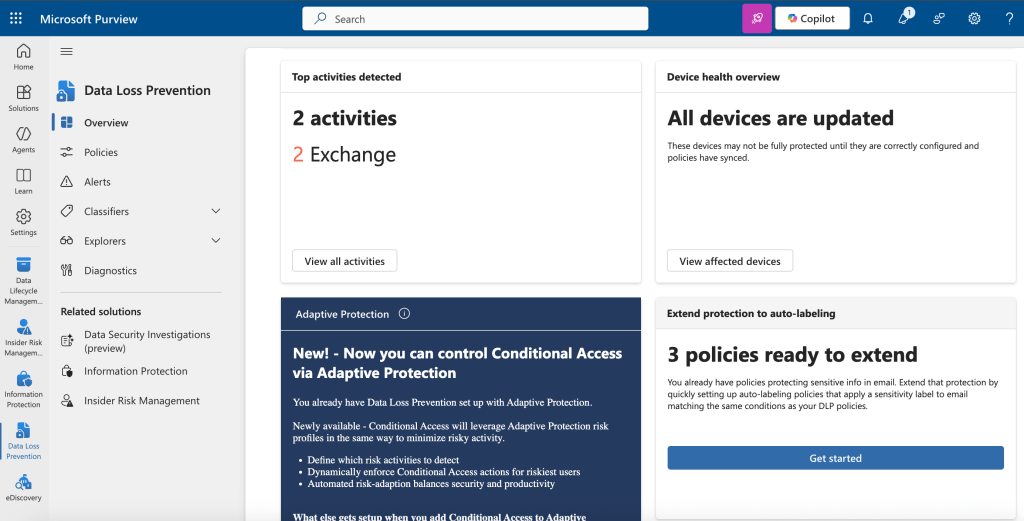
What is a Microsoft Purview Data Loss Prevention Policy?
Monitoring, warning, and blocking unapproved information flows is made possible by implementing Purview DLP policies.
Purview DLP policies are made up of the following major components:
- Templates – Does the desired DLP policy follow one of the provided templates, or is a custom policy required?
- Location – Which locations must the DLP policy apply to?
- Conditions – Within the locations, what data/activities does the DLP policy apply to?
- Actions – When the DLP policy recognizes the specified data/activities, what should the DLP policy do?
- Policy mode – How will the DLP policy be published? Will it be applied immediately? Or will it run in simulation mode to allow for testing and fine-tuning?
Often the most difficult step of deploying Purview DLP is determining which policies to create. Some questions organizations can ask themselves to help with this are:
- Which regulations must we comply with?
- Which internal policies must we consider?
- What types of sensitive data do we handle?
- Where does this sensitive data reside?
- What are common inter- and intra- organizational sensitive data flows?
However, questions 3 – 5 can often raise the classical “chicken and egg” problem. When an organization doesn’t have a clear understanding of the answers to questions 3 – 5 (which is very common!), DLP policies in monitor-only mode can be deployed to collect the insights that can help provide answers. Oftentimes, examining regulations, policies, and internal processes can help shine a light on which data and locations to prioritize during the monitor phase. In this way, organizations can provide answers to 3 – 5 informed by tailored insights.
As you will see in the upcoming blogs in this series, creating effective DLP policies requires an iterative approach based on continuous improvement and data-driven policy design.
Here is a wonderful resource by Microsoft detailing the process for designing a policy for your reference:
- Design a DLP policy – https://learn.microsoft.com/en-us/purview/dlp-policy-design
It is also very important that administrators regularly review the insights and alerts raised by DLP policies. Administrators can access these insights in the following dashboards:
- Microsoft Defender Incidents
- Microsoft Purview DLP Alerts
- Microsoft Purview DLP Activity Explorer
- Microsoft Purview DLP Content Explorer
- Microsoft Purview Data Security Posture Management
In an upcoming blog, we will do a deep dive into reviewing and managing DLP alerts. In the meantime, here are some great Microsoft Learn resources on DLP alerts for your reference:
- Learn about the DLP alerts dashboard: https://learn.microsoft.com/en-us/purview/dlp-alerts-dashboard-get-started
- Learn about investigating DLP alerts: https://learn.microsoft.com/en-us/purview/dlp-alert-investigation-learn
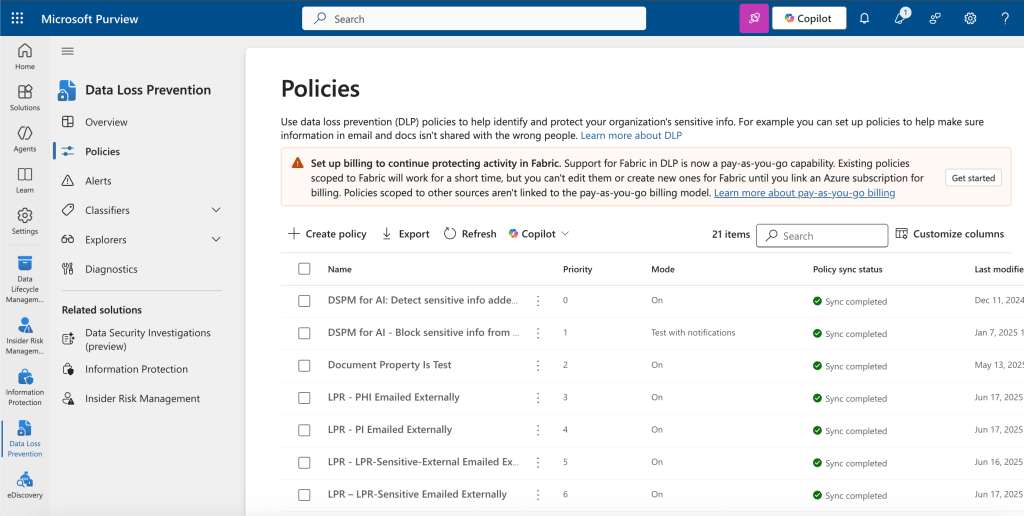
Why is Microsoft Purview Data Loss Prevention Important?
Along with Information Protection, organizations will often prioritize deploying Purview DLP – and this is for good reason! Deploying Purview DLP provides the following benefits to organizations:
- Increased data security and reduced risk of costly data breaches
- Enforced compliance to general as well as industry-specific regulations
- Improved understanding of the inter- and intra- organizational sensitive data flows
- User education on unapproved information flows leading to reduced insider risk
- Automated protection of sensitive data, reducing reliance on the SOC
Closing Thoughts
Microsoft Purview Data Loss Prevention is a powerful solution that helps organizations protect sensitive data by monitoring, educating, and enforcing controls across cloud, endpoint, and on-premises environments. It enables organizations to meet compliance requirements, reduce insider risks, and gain visibility into how sensitive data moves within and outside the organization. By taking an iterative, insight-driven approach to policy design and review, organizations can build a strong, adaptive data protection program that grows alongside their evolving security needs.
In my upcoming blog series, I will be diving deeper into various aspects of Purview DLP and providing practical insights to support organizations in successfully deploying this solution. Stay tuned!
 Anna Bordioug