
Photo by Markus Winkler on Unsplash
Microsoft Features: DSPM for AI
Estimated Reading Time: 6 minutes
Welcome back to my DSPM for AI blog series. In my previous blog, I reviewed the steps and considerations necessary to Get Started with Data Security Posture Management for AI.
In this blog, I’ll demonstrate the usage insights available to administrators in DSPM for AI, how to quickly create monitoring policies in Purview for AI activity, and provide some insights on how to best leverage this knowledge to improve your organization’s data security.
For those interested, here are links to the other blogs in my DSPM for AI series (links will become available as the blogs are published):
- An Introduction to Data Security Posture Management for AI
- Getting Started with Data Security Posture Management for AI
- Understanding Your Organization’s AI Activity with DSPM for AI
- Safeguarding AI Activity with DSPM for AI
Creating Purview Policies to Monitor for AI Activity
In order to collect insights on AI-related activities within your organization, administrators must create Purview policies that monitor for activities of interest. Purview has extremely extensive capabilities to support this effort, but a good start is the one-click policies suggested by DSPM for AI.
In my previous blog, I mentioned the “Extend your insights for data discovery” prerequisite that is shown on the Overview page, recommending the creation of the following Purview policies:
- Detect when users visit AI sites (insider risk management)
- Detect sensitive info pasted or uploaded to AI sites (data loss prevention)
Administrators can also navigate to the Recommendations page to receive policy recommendations tailored to the current state of their tenant. One such recommendation for the creation of a monitoring policy is the “Detect risky interactions in AI apps” (insider risk management).
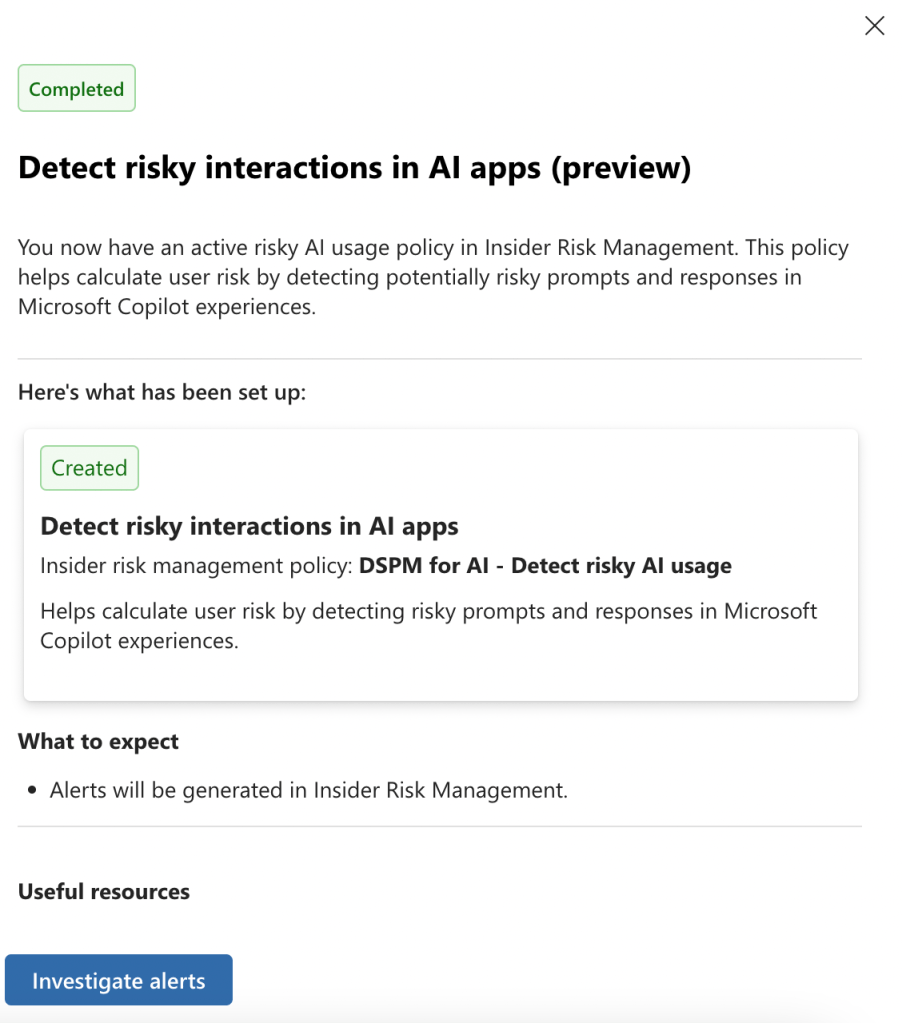
After deploying the one-click policies recommended in DSPM for AI, administrators can edit these policies to better tailor them to the organization.
DSPM for AI Reports
To quickly gain an understanding of your organization’s AI usage trends in terms of activity, data, and users, reference the reports automatically generated by DSPM for AI. These reports can be found on both the Overview and Reports tabs.
Each report contains AI usage insights that are collected using the AI policies deployed across the organization. For this reason, not every report may be populated in your tenant. It really depends on which solutions you have deployed, as specified in the “Purview Solution Dependency” column in the table below.
| Report Group | Report Name | Purview Solution Dependency * |
| Activity | Total interactions over time with Microsoft Copilot | n/a |
| Activity | Total interactions over time with enterprise AI apps | n/a |
| Activity | Total visits to other AI apps | Insider Risk Management |
| Data | Sensitive interactions per AI app | Data Classification, Data Loss Prevention, Communication Compliance |
| Data | Top unethical AI interactions | Communication Compliance |
| Data | Top sensitivity labels referenced in Copilot for Microsoft 365 | Information Protection |
| User | Insider risk severity | Insider Risk Management |
| User | Insider risk severity per AI app | Insider Risk Management |
* Although not explicitly mentioned as a distinct solution in the above table, every report relies on the insights collected by Purview Audit.

For example, the “Insider Risk Severity per AI App” report summarizes the insights collected by the one-click policy named “DSPM for AI – Detect when users visit AI sites”, which is created in Purview Insider Risk Management.

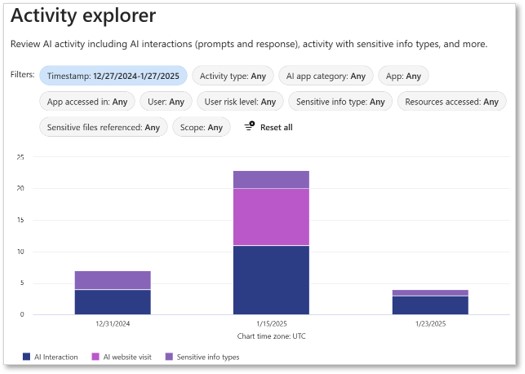
It is also important to note that the insights surfaced in various reports are graphical representations of data that can be found in the AI Activity Explorer. If you click on “View Details” under a given report, you will be taken to the AI Activity Explorer, pre-filtered depending on the report for which you are viewing details.
DSPM for AI Activity Explorer
Administrators can use the DSPM for AI Activity Explorer dashboard to dig deeper into their organization’s AI usage. The following AI-related activities are currently summarized in the Activity Explorer:
- AI Interaction: user interacts with an AI site
- AI Website Visit: user navigates to an AI site
- DLP Rule Match: data loss prevention rule matches in a user interaction with an AI site
- Sensitive Info Types: sensitive information types found in a user interaction with an AI site
To investigate the insights further, administrators can filter the explorer using the following conditions:
- Activity type and user
- Date and time
- AI app category
- AI app
- Sensitive information types (if applicable)
- Files referenced (if applicable)
- Sensitive files referenced (if applicable)
The AI Activity Explorer helps administrators identify risky activities that pose data security threats and investigate activities related to security incidents for to support effective remediation.
Making the Most of These Insights
With so many great insights at our fingertips, it’s very important to ensure that organizations are maximizing the benefits they reap from this knowledge.
As with all reports, it’s crucial to have a dedicated person / team to regularly review them and kickoff mitigation actions when applicable. The highest quality insights cannot make a positive security impact without review and action.
Some additional tips to maximize the benefits of DSPM for AI Reports and the Activity Explorer include:
- Prioritize investigating and remediating high risk actions based on filters such as sensitivity label and sensitive information type.
- Leverage AI-driven insights provided by recommendations in DSPM for AI to identify priority actions.
- Monitor trends over time to spot increases in risky AI activity, identify root causes, and determine effective remediation / mitigation actions.
- Regularly share top insights with relevant cross-functional stakeholders (e.g., IT, legal, etc.) to increase awareness and support for response to AI-driven data security threats.
- Consider leveraging Security Copilot to help your IT security team quickly identify and action high priority insights.
Closing Thoughts
DSPM for AI centralizes AI usage insights across your organization. Furthermore, it provides both high-level reports and detailed insights into specific AI-related activities taken by your users. This gives administrators the necessary knowledge and tools they need to proactively manage data security risks among widespread AI usage.
In my next blog, I’ll discuss how organizations can protect their data with the help of DSPM for AI. Stay tuned!
 Anna Bordioug