
Microsoft 365 Features: Microsoft Purview Adaptive Protection, Microsoft Purview Insider Risk Management, Microsoft Purview Data Loss Prevention, Microsoft Purview Data Lifecycle Management, Microsoft Entra Conditional Access
As insider threats become more prevalent and harder to detect, organizations are increasing protective measures to prevent data loss or breaches. Although these measures certainly help to increase security, they also often impede on user productivity. Therefore, organizations find themselves once again trying to strike the difficult balance between security and productivity.
The Security-Productivity Trade Off
One of the key advantages of Microsoft Purview Insider Risk Management (IRM) is that it helps admins proactively identify, monitor, and respond to potential security threats by identifying and flagging sequences of risky user behaviour. For example, if an employee hands in their 2-weeks resignation notice, IRM can flag this employee as higher risk. This higher risk assignment means that the system will closely track the user’s actions, helping admins prevent unwanted exfiltration, data leaks, etc. If you need more context on what IRM is and what it does, feel free to reference Microsoft Learn documentation and my colleague’s (David Drever – Microsoft MVP) great IRM Overview. What IRM will not do, however, is dynamically prevent risky users from accessing certain apps, block data leaks, and retain risky user data for longer.
These tasks are managed by tools like Microsoft Entra Conditional Access for controlling app access, Microsoft Purview DLP for preventing data leaks, and Microsoft Purview DLM for data retention. However, these tools on their own apply uniform policies to all users, lacking the ability to adapt dynamically to each user’s changing risk level. This makes the trade-off between security and user productivity ever so difficult to balance.
This is where Microsoft Purview Adaptive Protection comes in. Adaptive Protection leverages IRM to proactively identify risky users and provides a way to customize policy actions in Conditional Access, DLP, and DLM based on a user’s risk level. In this way, the most restrictive actions are dynamically applied to risky users, while non-risky users can continue their day-to-day business operations as usual, proactively protecting sensitive data while maximizing user productivity.
Real-World Scenarios of Adaptive Protection in Action
Here are some example scenarios demonstrating why Microsoft Purview Adaptive Protection is so useful:
1. Block attempted data exfiltration by a departing user
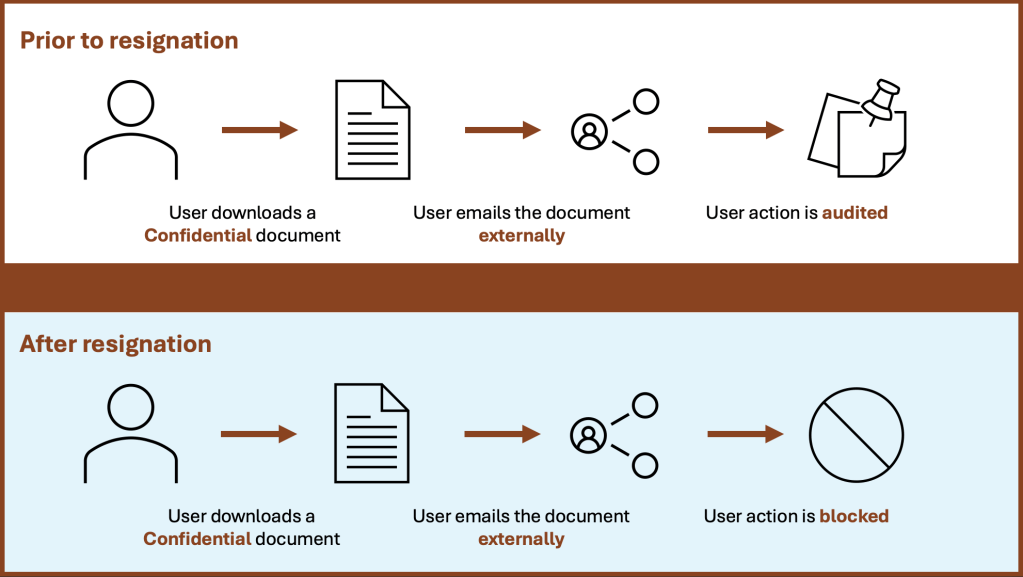
For our first example, let’s imagine a user has handed in their 2-weeks resignation notice. Shortly after, the user’s records are updated in the company’s HR system (e.g., Workday). By leveraging the HR connector, Microsoft Purview IRM becomes quickly aware of the user’s resignation, and so, elevates their risk. Now let’s say that this user, after handing in their resignation, decides to download a Confidential file and email it to an external user. Using Adaptive Protection, DLP recognizes that the conditions for the policy are met and blocks this action, keeping a record of this in the unified audit log.
2. Retain deleted data for a user with confirmed past data exfiltration attempts
Now let’s imagine that we have a user for which IRM has confirmed past data exfiltration attempts, and so, elevated their risk level (e.g., user downloads a file from SharePoint and emails it externally). Now let’s say that this user accesses a SharePoint site and deletes a document accidentally or maliciously (i.e., data destruction). Using Adaptive Protection, DLM recognizes that the conditions for the adaptive auto-labeling policy are met and applies a retention label to the content automatically, retaining it for 120 days.
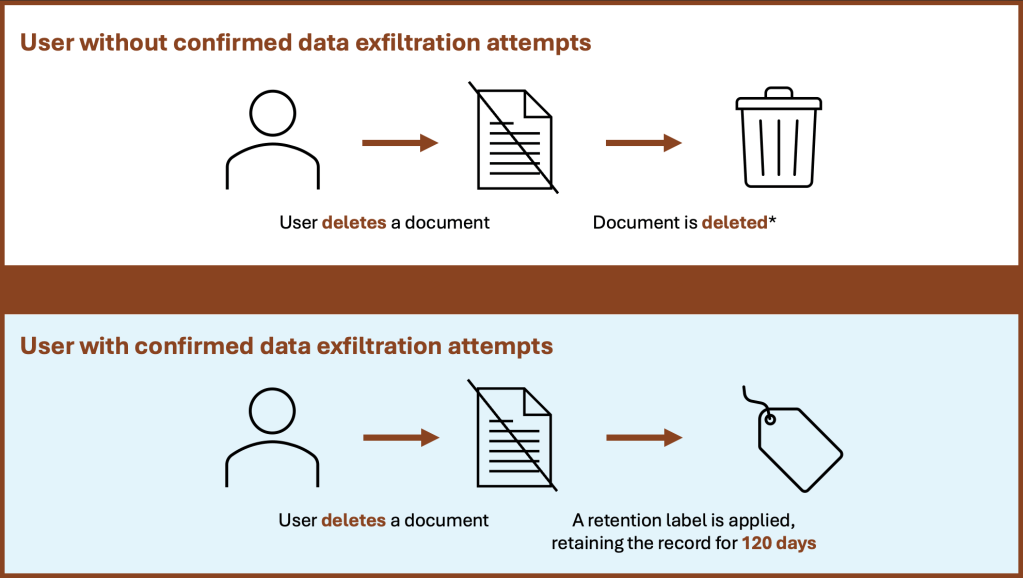
* unless an organization-wide retention policy / auto-labeling policy is configured
3. Require agreement to terms of use from a risky user before accessing an application
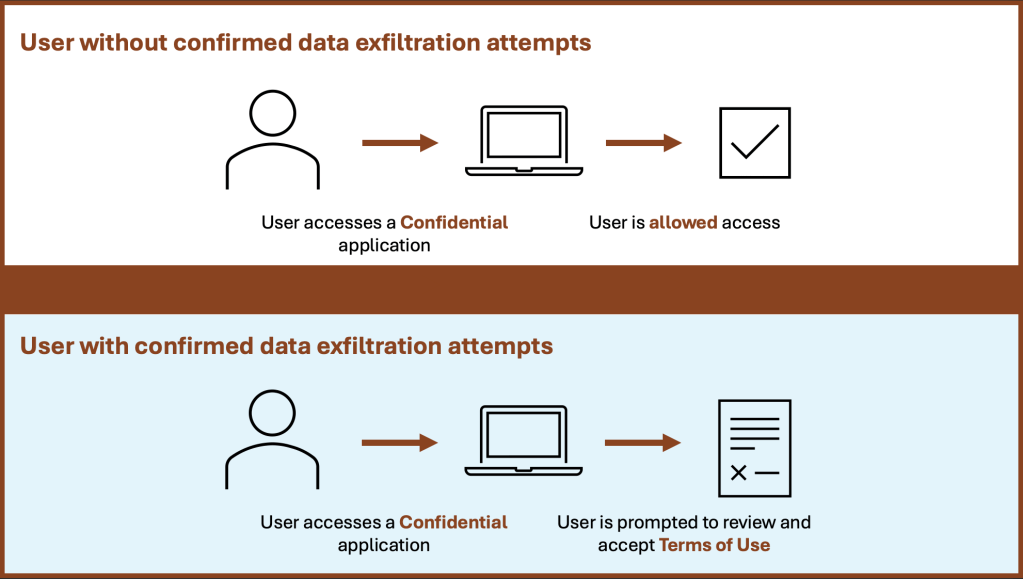
Finally, let’s again imagine a risky user with confirmed past data exfiltration attempts. Let’s now say that this user attempts to access a confidential application. Using Adaptive Protection, Conditional Access knows to show this user a terms of use agreement (or optionally block access).
Conclusion
Microsoft Purview Adaptive Protection gives organizations the agility they need to protect sensitive data without compromising productivity. By adapting policies based on user risk, it ensures that high-risk users are closely monitored while everyday users can continue working without interruptions. In my next blog post, I’ll walk you through how to configure these powerful tools to fit your organization’s needs. Stay tuned!
 Anna Bordioug